STRiPES
The problem
Caregivers logging a loved one’s GI symptoms and a medical study kept getting lost in the app, and we didn’t know which evaluation method to trust to find out why.
The solution
I compared usability testing with a cognitive walkthrough, published the findings, then used them to redesign STRiPES as a mobile-first app.
The outcome
Peer-reviewed paper
lead author, HFES Annual Meeting 2026
17 unique issues
found across 3 evaluators and 7 caregivers
Mobile redesign
navigation, guidance and data entry reworked
01 | OVERVIEW
A research project that became a redesign: I compared two ways of finding usability problems, then used what each one caught to rebuild a health-tracking app for caregivers.
STRiPES is a gastrointestinal (GI) symptom tracker for caregivers of people with neurodevelopmental disorders such as GRIN2B. It also runs the Blue Meal Study, a motility study in which caregivers feed a blue-dyed meal and log bowel movements to show how long digestion takes.
As a graduate student assistant at the University of Miami User Experience Lab, I led the evaluation of the app with usability testing and a cognitive walkthrough, wrote the paper as lead author, and led the redesign that came out of it.
02 | CONTEXT
Design Context
The app
A symptom diaryCaregivers record meals, bowel movements, pain, GI symptoms, sleep and mood for someone who often can’t describe how they feel.
The study
Blue Meal StudyAfter fasting, a caregiver feeds a blue meal, then logs every bowel movement in two stages until the color clears.
The constraint
Tested on desktop, designed for mobileThe version we evaluated was the desktop web app, but the redesign targets mobile, where caregivers actually log.
Who it’s for
Caregivers
Logging for someone elseParents and caregivers recording symptoms they observe, often between other demands.
People with GRIN2B
Often non-verbalThey can’t self-report, so what the caregiver sees and records is the data.
Researchers
Need clean dataStudy results depend on caregivers completing each step correctly and on time.
03 | RESEARCH GOAL
If we can only afford one evaluation, which method finds the problems that matter?
A cognitive walkthrough needs no recruiting, which matters when your users are caregivers with little spare time.
Usability testing reveals how people behave, but recruiting caregivers of people with rare conditions is hard.
We wanted to know how the issues from each method differ and overlap for a health app used by caregivers.
How we ran it
Cognitive walkthrough
3 evaluatorsUX-trained researchers, new to the method, stepping through every task.
Usability testing
7 caregiversModerated remote sessions on Zoom and Userlytics, thinking aloud.
Tasks
6 identical tasksFrom finding study info to completing stage two.
Data
Issues + surveysEvery issue coded by task, category and who found it.
04 | RESEARCH
What Each Method Found
Across both methods, usability testing (UT) and cognitive walkthrough (CW), we logged 17 unique issues. Only 6 showed up in both, so using just one method would have missed most of the picture.
Found by both UT and CW
Navigation, terminology, hierarchyThe surface problems were obvious to experts and users alike, so they were the safest to fix first.
Cognitive walkthrough only
System logicUnexpected redirects, missing confirmations, vague task wording and functionality gaps.
Usability testing only
Real-world useRepetitive entry, a mismatch with how caregivers track symptoms, and not knowing when to log again.
Where Caregivers Got Stuck
Completion fell as tasks got deeper into the study. Most people couldn’t finish stage two.
Task completion in usability testing
What Kind of Problems
Issues by category (issues can fall in more than one)
What It Meant
unique issues from usability testing vs. cognitive walkthrough, the opposite of what prior literature suggests
total issues found by usability testing (13) and cognitive walkthrough (10)
caregivers completed stage two, and usability testing alone revealed some thought the app was one-time use
Recommendation
Use both, and fix the overlap first.Issues both methods found are the most reliable. Then use cognitive walkthrough for system logic and usability testing for how the app fits real caregiving routines. Our findings pointed the redesign to task guidance, navigation and data entry.
05 | REDESIGN
Each finding became a design decision for mobile.
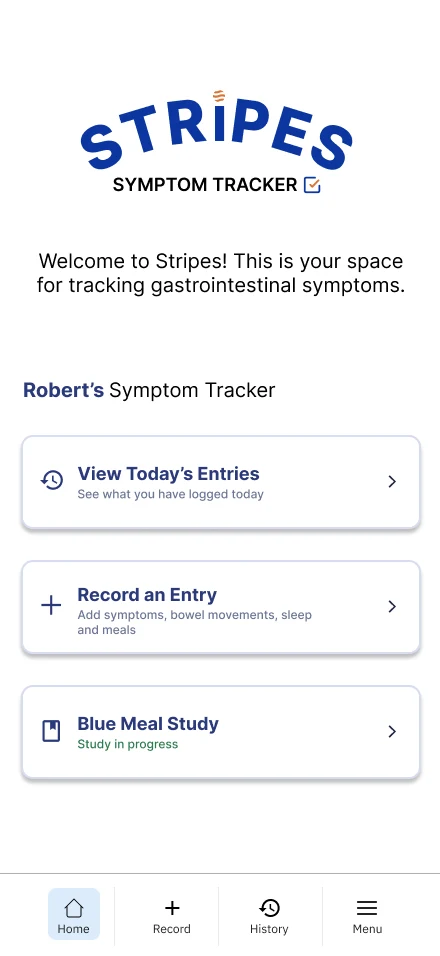
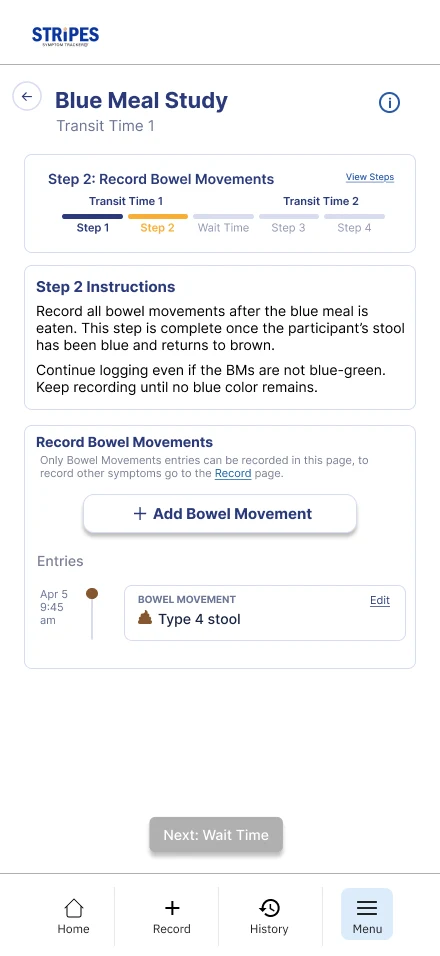
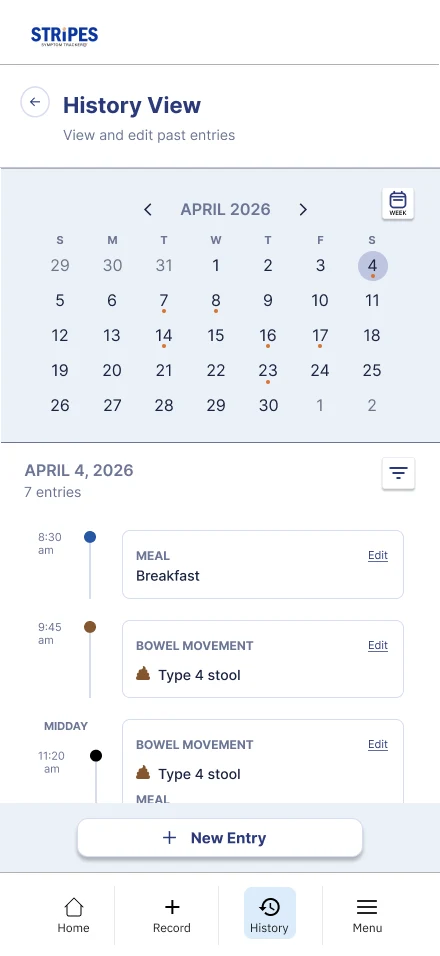
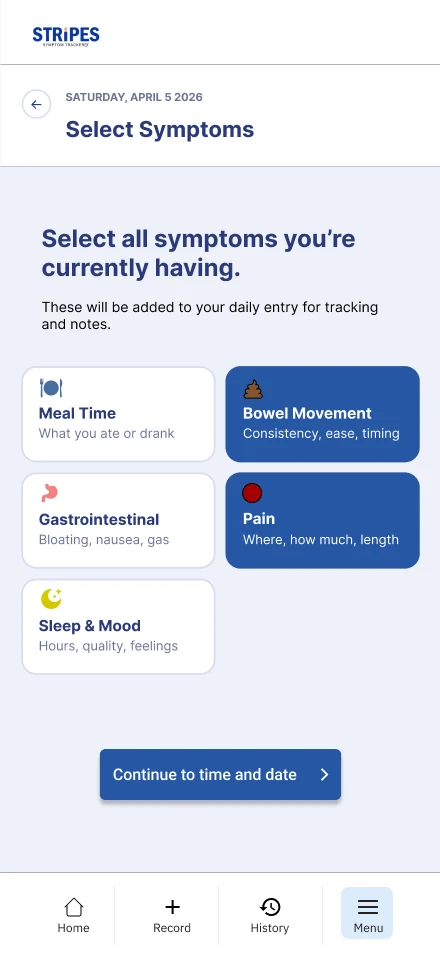
Below, the old desktop screen sits beside the redesigned mobile screen that answers it.
1. Make the Study Easy to Find and Start
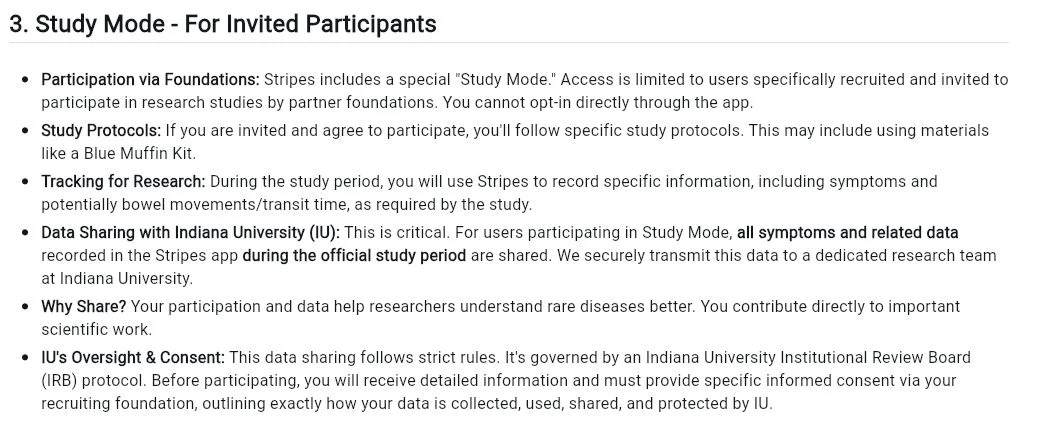
The Study tab opened Terms of Service. All three cognitive walkthrough evaluators were sent there, and the study was labeled “For Invited Participants” only.
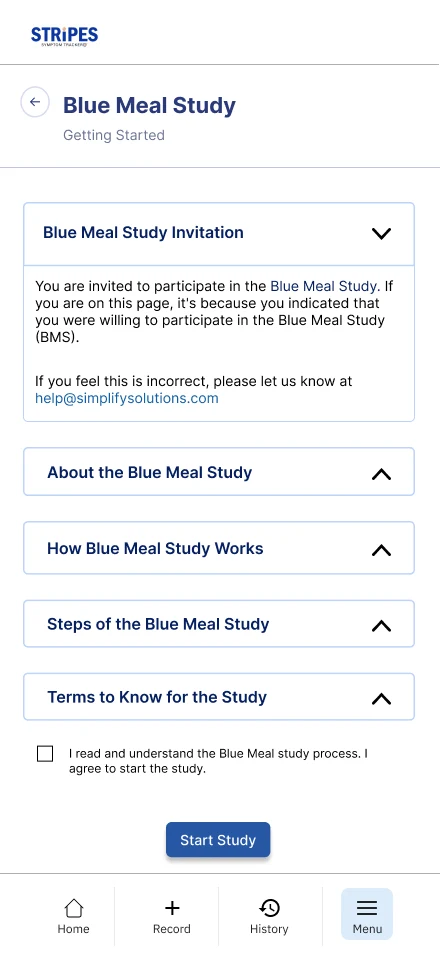
A real starting point. Terms moved out of the study path. “Getting Started” has collapsible sections for what, how and steps, with one checkbox and a clear Start Study button.
Labels clashed. “Test” and “study” were used interchangeably, and “Blue Meal” and “BM” overlapped.
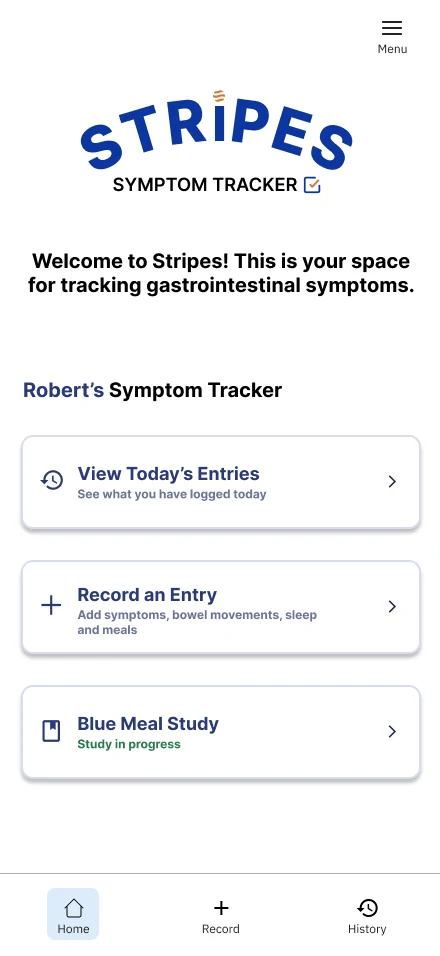
One name, one door. The home screen shows “Blue Meal Study” with its live status, and all copy now says “study.”

2. Show Where You Are and What’s Next
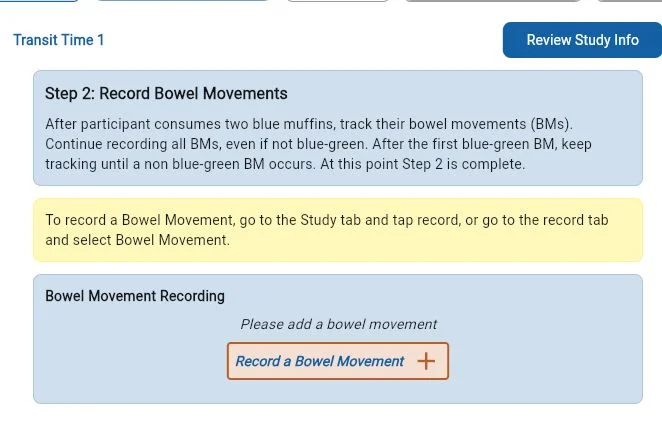
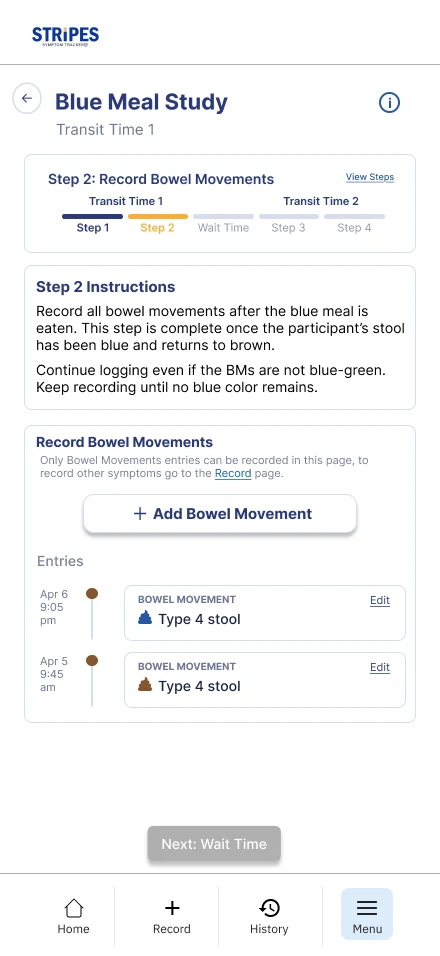
People got lost mid-study. A yellow banner read like a pop-up ad, and nothing showed progress or what came after waiting.
A visible path. A step tracker shows both transit times, instructions sit in one card, and bowel movements are logged on the same page.
3. Fit How Caregivers Actually Log
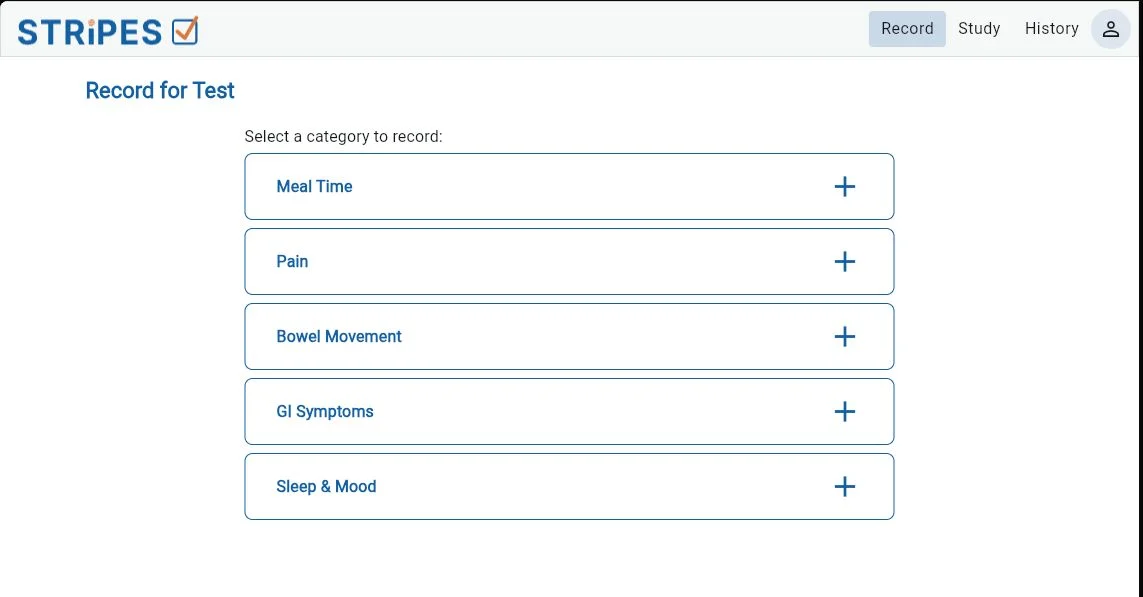
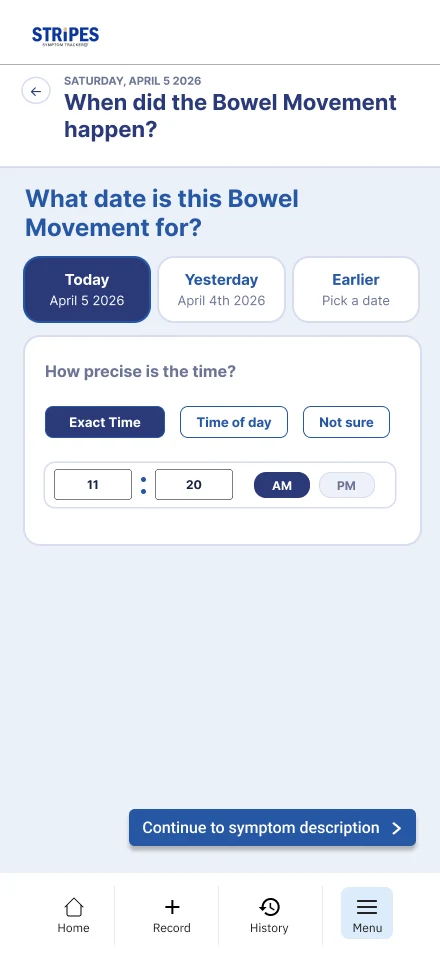
Logging felt repetitive and rigid. One category at a time, a fixed symptom list, and no link between meals, symptoms and timing.
Pick everything at once. Caregivers select every category they’re seeing, then move through time and details in one flow with a date and “not sure” time option.
4. Explain Why, and Show the Past
Insight
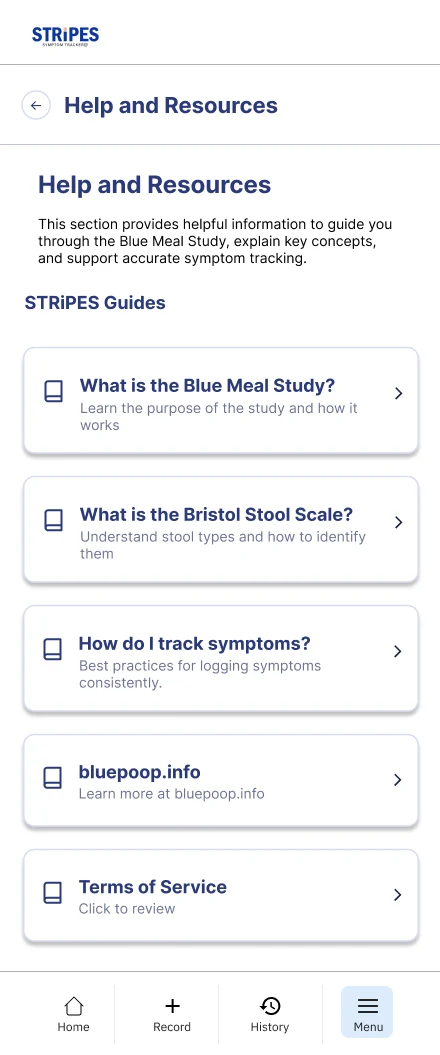
Users couldn’t see past entries or why tracking mattered. Some thought the app was one-time use.
Design
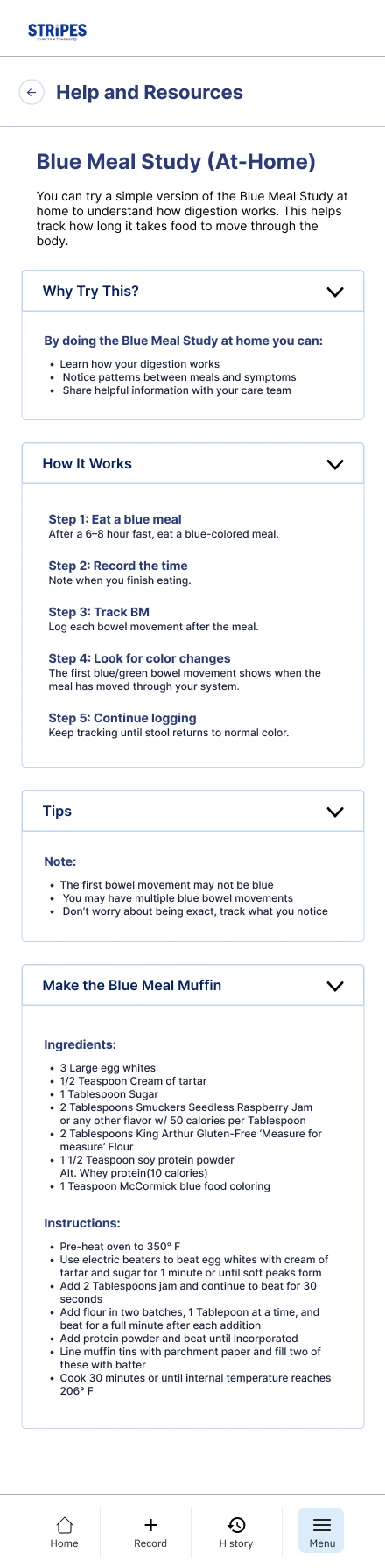
A history calendar and a Help & Resources hub. Entries show on a timeline, and plain-language guides cover the study and stool types.
06 | IMPACT & TAKEAWAYS
Impact
Published
Lead author of “Cognitive Walkthrough vs. Usability Testing” in the HFES Annual Meeting Proceedings, 2026.
Actionable
Findings were prioritized by overlap and handed to the team as a list of issues with fixes.
Rebuilt for mobile
A new flow for the study, logging, history and resources, designed in Figma.
What’s Next
Validate it with caregivers on mobile.
Repeat with more evaluators and experienced cognitive walkthrough experts.
Notify caregivers when waiting time ends.
Redesign pain and stool scales for non-verbal users.
Hand off to engineering.
What I Learned
Methods find different things
Experts caught system logic, users caught real-life fit. Neither one alone told the whole story.
Words are navigation
A mislabeled tab sent every evaluator to the wrong place, so naming was a top fix.
Research is a design input
Writing the paper forced me to make each design decision traceable to a finding.